
02-Chat Client
教程制作:码神之路(https://www.mszlu.com/docs/ai/msai/01.html)
AI Agent实战教程:https://www.mszlu.com/docs/ai/msai/01.html
- 提供Go和Java版本,目前Go版本已经完结, Java版本正在更新中...
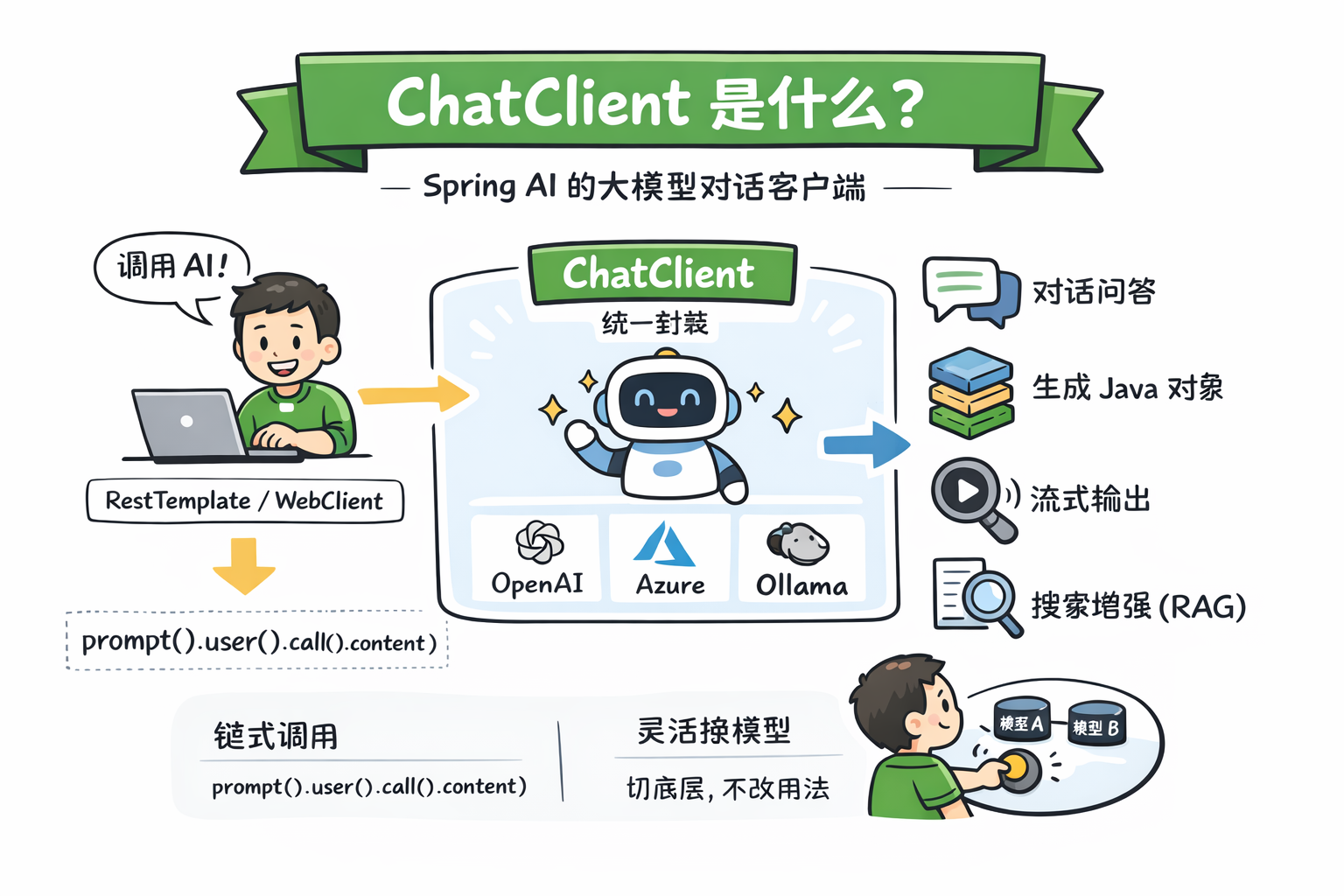
ChatModel虽然可以直接和AI对话,但这种方式不够灵活。
Chat Client 是一个更高级的封装:
- 封装 Prompt 构建
- 帮你自动管理对话历史
- 支持流式输出
- 统一不同模型接口
- 支持结构化输出
1. 基础用法
1.1 提示词概念
提示词就是一次请求里输入给模型的内容。
大模型会根据提示词生成答案,所以提示词在AI开发中是非常重要的。
不同的提示词产生的效果不同,所以提示词也是一门工程,一门学科。
有个专业词汇叫提示词工程。
我举个简单的例子:
❌ 普通提示词
解释Java
✅ 优秀提示词
请用通俗语言,给初学者解释Java,并举一个简单代码示例
1.1.1 提示词常用技巧
1️⃣ 设定角色
你是一个资深后端架构师
2️⃣ 明确输出格式
请用JSON格式返回
3️⃣ 给示例(Few-shot)
输入:1+1
输出:2

输入:2+2
输出:4

输入:3+3
输出:
2
3
4
5
6
7
8
4️⃣ 限制风格
用一句话回答
1.1.2 提示词分类
在大模型中,提示词通常分为三类:
- System Prompt(系统提示词)
- 控制 AI:性格,风格,专业领域
- User Prompt(用户提示词)
- 用户问题本身
- Assistant(历史回答)
- 参与下一轮生成(成为上下文)
1.2 用法
修改 ChatService.java,添加 Chat Client 的支持:
package com.mszlu.ai.alibaba.service;

import org.springframework.ai.chat.client.ChatClient;
import org.springframework.ai.chat.messages.SystemMessage;
import org.springframework.ai.chat.messages.UserMessage;
import org.springframework.ai.chat.model.ChatModel;
import org.springframework.ai.chat.model.ChatResponse;
import org.springframework.ai.chat.prompt.Prompt;
import org.springframework.stereotype.Service;
/**
 * 使用 Chat Client 的 AI 服务
 */
@Service
public class ChatService {

    private final ChatModel chatModel;
    private final ChatClient chatClient;

    /**
     * 构造器注入 ChatClient
     * Spring AI 会自动创建并配置好 ChatClient
     */
    public ChatService(ChatModel chatModel) {
        this.chatModel = chatModel;
        this.chatClient = ChatClient.builder(chatModel)
                .defaultSystem("你是一个诗人,请用诗人的方式回答问题.")  // 默认系统提示
                .build();
    }
    /**
     * 使用 Chat Client 进行简单对话
     */
    public String chatWithClient(String userInput) {
        return chatClient.prompt()
                .user(userInput)  // 用户输入
                .call()           // 调用模型
                .content();       // 获取回复内容
    }

    public String simpleChat(String question) {
        return chatModel.call(question);
    }

    public String advancedChat(String question) {
        SystemMessage systemMessage = new SystemMessage("你是一个诗人,请用诗人的方式回答问题.");
        UserMessage userMessage = new UserMessage(question);
        Prompt prompt = new Prompt(systemMessage, userMessage);
        ChatResponse chatResponse = chatModel.call(prompt);
        return chatResponse.getResult().getOutput().getText();
    }
}
2
3
4
5
6
7
8
9
10
11
12
13
14
15
16
17
18
19
20
21
22
23
24
25
26
27
28
29
30
31
32
33
34
35
36
37
38
39
40
41
42
43
44
45
46
47
48
49
50
51
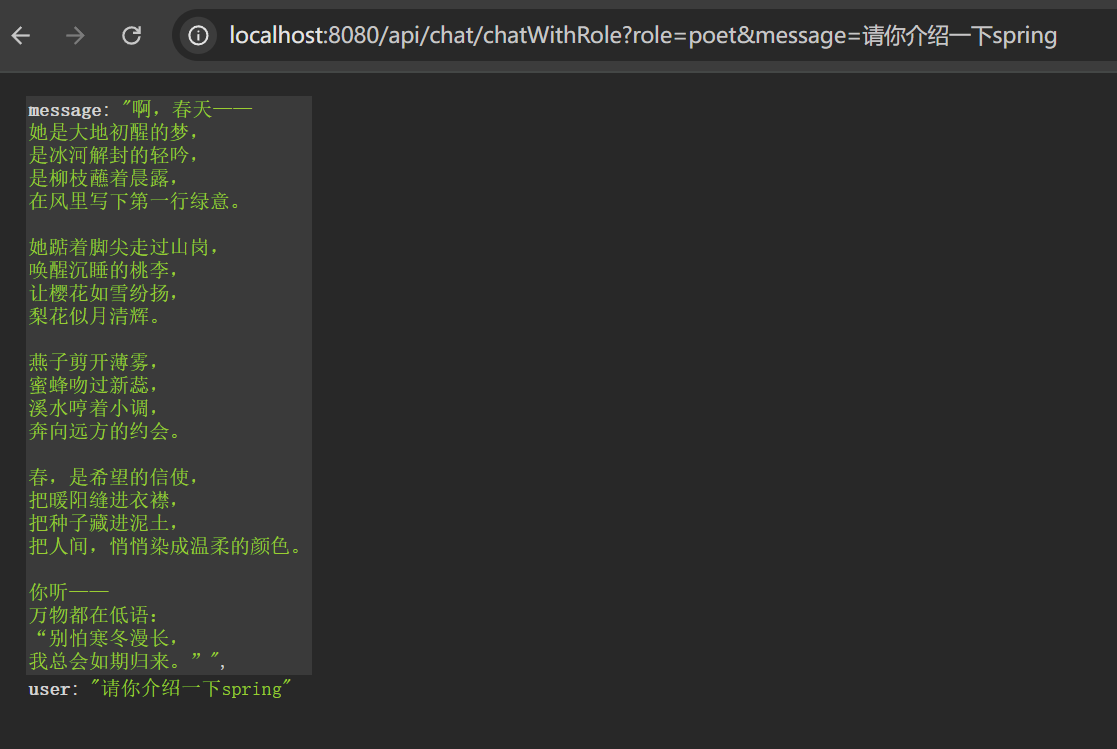
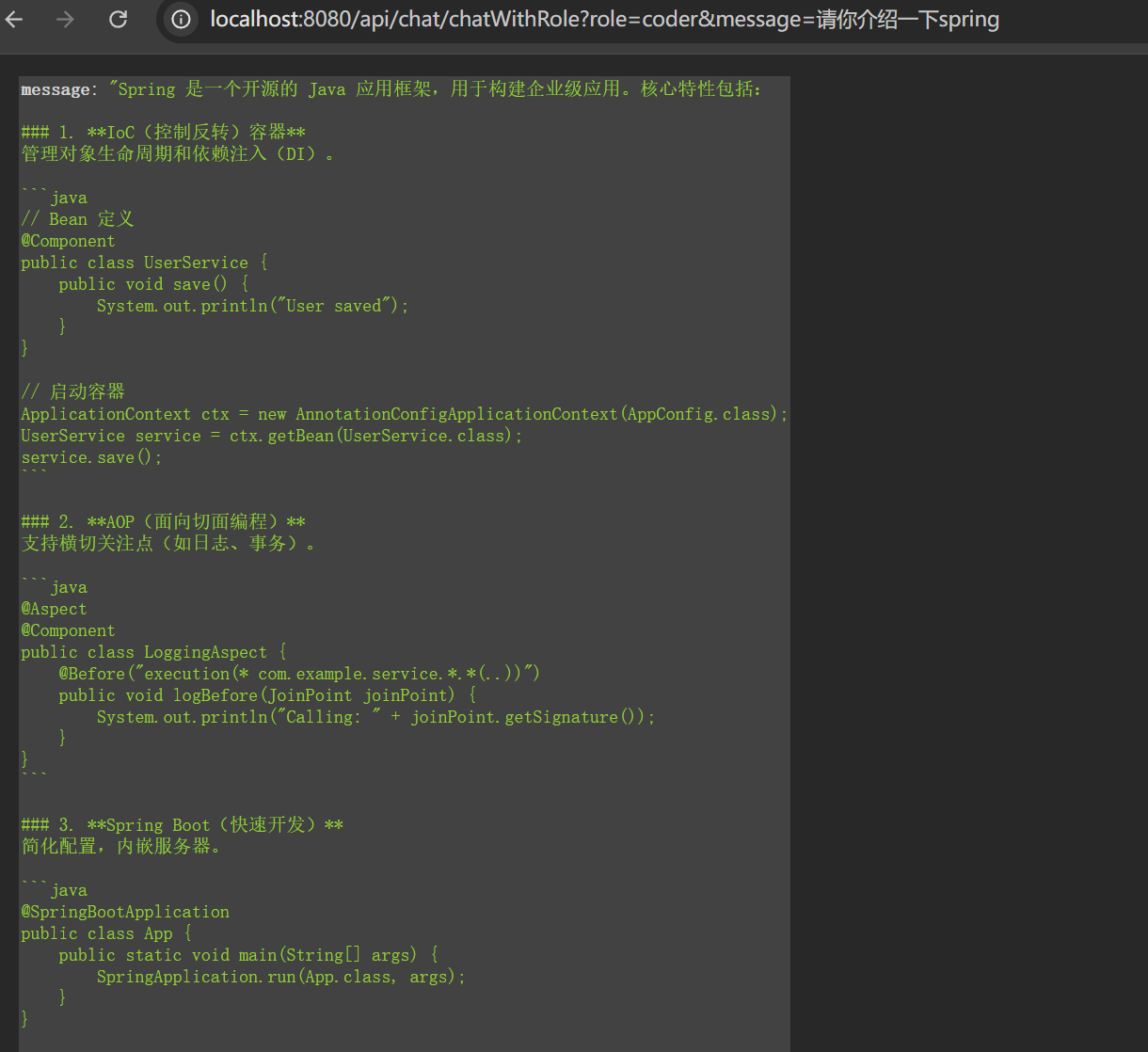
1.2 动态提示词
  /**
     * 根据角色类型使用不同的系统提示
     */
    public String chatWithRole(String role, String message) {
        String systemPrompt = switch (role) {
            case "teacher" -> "你是一个耐心的老师,用简单的话解释复杂概念。";
            case "poet" -> "你是一个诗人,用优美的诗句回答问题。";
            case "coder" -> "你是一个程序员,回答简洁,多用代码示例。";
            default -> "你是一个 helpful 的助手。";
        };

        return chatClient.prompt()
            .system(systemPrompt)  // 动态设置系统提示
            .user(message)
            .call()
            .content();
    }
2
3
4
5
6
7
8
9
10
11
12
13
14
15
16
17
1.3 测试
@GetMapping("/chatWithRole")
    public Map<String, String> chatWithRole(@RequestParam  String role, @RequestParam String message) {
        String aiResponse = chatService.chatWithRole(role, message);
        return Map.of(
                "user", message,
                "message", aiResponse
        );
    }
2
3
4
5
6
7
8
2. 流式输出
一般大模型生成的内容比较多,如果等内容全部生成完成,在响应,可能需要几分钟。
这时候使用流式输出,能极大的提升体验感:AI生成一个字就返回一个字,像打字机一样实时显示。
2.1 service
package com.mszlu.ai.alibaba.service;

import org.springframework.ai.chat.client.ChatClient;
import org.springframework.ai.chat.model.ChatModel;
import org.springframework.stereotype.Service;
import reactor.core.publisher.Flux;

@Service
public class StreamingService {
    private final ChatClient chatClient;

    public StreamingService(ChatModel chatModel) {
        this.chatClient = ChatClient.builder(chatModel).build();
    }

    /**
     * 流式对话
     * 返回 Flux<String>,可以实时接收 AI 的回复
     */
    public Flux<String> streamChat(String message) {
        return chatClient.prompt()
                .user(message)
                .stream()           // 使用 stream() 代替 call()
                .content();         // 返回流式内容
    }
}
2
3
4
5
6
7
8
9
10
11
12
13
14
15
16
17
18
19
20
21
22
23
24
25
26
27
2.2 controller(SSE)
2.2.1 SSE介绍
SSE(Server-Sent Events)= 服务端持续推送数据给浏览器的技术。
SSE 是纯文本协议:
data: 内容1

data: 内容2

data: 内容3
2
3
4
5
每条消息:
- 以
data:开头 - 空行分隔
浏览器会“像水流一样”不断接收
2.2.2 代码
package com.mszlu.ai.alibaba.controller;

import com.mszlu.ai.alibaba.service.StreamingService;
import org.springframework.beans.factory.annotation.Autowired;
import org.springframework.http.MediaType;
import org.springframework.http.codec.ServerSentEvent;
import org.springframework.web.bind.annotation.GetMapping;
import org.springframework.web.bind.annotation.RequestMapping;
import org.springframework.web.bind.annotation.RequestParam;
import org.springframework.web.bind.annotation.RestController;
import reactor.core.publisher.Flux;

@RestController
@RequestMapping("/api/stream")
public class StreamingController {

    private final StreamingService streamingService;

    public StreamingController(StreamingService streamingService) {
        this.streamingService = streamingService;
    }

    /**
     * SSE 流式对话接口
     *
     * 前端使用 EventSource 接收:
     * const eventSource = new EventSource('/api/stream/chat?message=你好');
     * eventSource.onmessage = (event) => {
     *     console.log(event.data);  // 实时接收每个字
     * };
     */
    @GetMapping(value = "/chat", produces = MediaType.TEXT_EVENT_STREAM_VALUE)
    public Flux<ServerSentEvent<String>> streamChat(@RequestParam String message) {
        return streamingService.streamChat(message)
                .map(content -> ServerSentEvent.builder(content).build());
    }
}
2
3
4
5
6
7
8
9
10
11
12
13
14
15
16
17
18
19
20
21
22
23
24
25
26
27
28
29
30
31
32
33
34
35
36
37
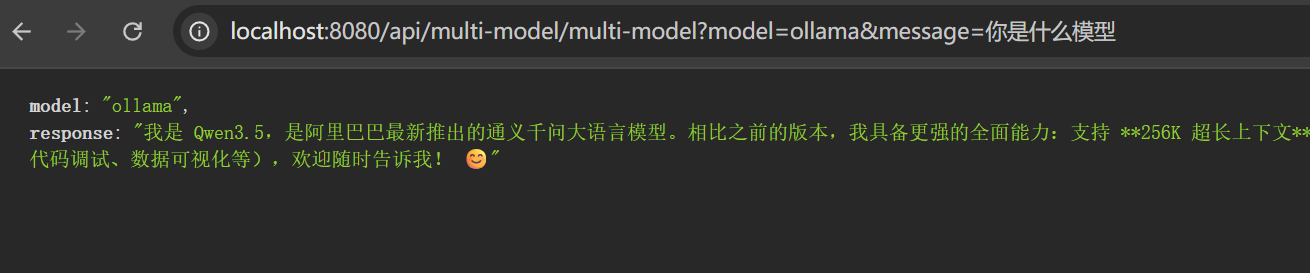
3. 支持多Chat Model
Spring AI Alibaba 支持多种 AI 模型:
| 提供方 | 依赖 |
|---|---|
| 阿里云 DashScope | spring-ai-alibaba-starter-dashscope |
| OpenAI | sspring-ai-starter-model-openai |
| DeepSeek | spring-ai-starter-model-deepseek |
| Ollama | spring-ai-starter-model-ollama |
| Azure OpenAI | spring-ai-starter-model-azure-openai |
| Anthropic | spring-ai-starter-model-anthropic |
我们可以同时配置多个模型
3.1 配置多个模型
修改 application.yml,配置多个模型:
spring:
  application:
    name: spring-ai-alibaba
  ai:
    dashscope:
      # 你的阿里云 DashScope API Key,这里配置环境变量
      api-key: ${AI_DASHSCOPE_API_KEY:default-key}
      chat:
        options:
          model: qwen3-max
    ollama:
      base-url: http://localhost:11434
      chat:
        model: qwen3.5:35b
# 日志级别
logging:
  level:
    com.alibaba.cloud.ai: DEBUG
2
3
4
5
6
7
8
9
10
11
12
13
14
15
16
17
18
3.2 运行时切换模型
 <!-- ollama 模型支持 -->
        <dependency>
            <groupId>org.springframework.ai</groupId>
            <artifactId>spring-ai-starter-model-ollama</artifactId>
        </dependency>
2
3
4
5
package com.mszlu.ai.alibaba.service;

import org.springframework.ai.chat.client.ChatClient;
import org.springframework.ai.chat.model.ChatModel;
import org.springframework.beans.factory.annotation.Autowired;
import org.springframework.beans.factory.annotation.Qualifier;
import org.springframework.context.annotation.Primary;
import org.springframework.stereotype.Service;

@Service
public class MultiModelService {

    // 注入多个模型
    private final ChatModel dashScopeChatModel;
    private final ChatModel ollamaChatModel;
	//这里注意其他的service也要加 @Qualifier("dashScopeChatModel")
    public MultiModelService( @Qualifier("dashScopeChatModel") ChatModel dashScopeChatModel,
                             @Qualifier("ollamaChatModel") ChatModel ollamaChatModel) {
        this.dashScopeChatModel = dashScopeChatModel;
        this.ollamaChatModel = ollamaChatModel;
    }

    /**
     * 根据模型名称切换
     */
    public String chatWithModel(String modelName, String message) {
        ChatModel selectedModel = switch (modelName) {
            case "ollama" -> ollamaChatModel;
            default -> dashScopeChatModel;  // 默认使用 DashScope
        };

        ChatClient chatClient = ChatClient.builder(selectedModel).build();
        return chatClient.prompt()
            .user(message)
            .call()
            .content();
    }
}
2
3
4
5
6
7
8
9
10
11
12
13
14
15
16
17
18
19
20
21
22
23
24
25
26
27
28
29
30
31
32
33
34
35
36
37
38
3.3 Rest API
package com.mszlu.ai.alibaba.controller;

import com.mszlu.ai.alibaba.service.MultiModelService;
import org.springframework.web.bind.annotation.GetMapping;
import org.springframework.web.bind.annotation.RequestMapping;
import org.springframework.web.bind.annotation.RequestParam;
import org.springframework.web.bind.annotation.RestController;

import java.util.Map;
@RestController
@RequestMapping("/api/multi-model")
public class MultiModelController {

    private final MultiModelService multiModelService;
    public MultiModelController(MultiModelService multiModelService) {
        this.multiModelService = multiModelService;
    }
    @GetMapping("/multi-model")
    public Map<String, String> multiModelChat(
            @RequestParam(defaultValue = "dashscope") String model,
            @RequestParam String message) {

        String response = multiModelService.chatWithModel(model, message);

        return Map.of(
                "model", model,
                "response", response
        );
    }
}
2
3
4
5
6
7
8
9
10
11
12
13
14
15
16
17
18
19
20
21
22
23
24
25
26
27
28
29
30
31

4. 高级功能
4.1 带上下文的对话
4.1.1 上下文概念
举一个例子:
用户:什么是Redis?
AI:...
用户:它怎么用?
2
3
如果没有上下文,用户在提出问题它怎么用?时,AI根本不知道你在问什么。
但是有了上下文,AI就能理解它=Redis
上下文就是: 输入给模型的全部文本。
在Spring AI中,上下文如下:
System: 你是一个老师
User: 什么是微服务?
Assistant: ...
User: 举个例子
2
3
4
在上下文中有个很重要的概念是上下文窗口,比如:
8K tokens
32K tokens
128K tokens
如果上下文超过上下文窗口,内容就会截断,导致大模型遗忘之前的内容。
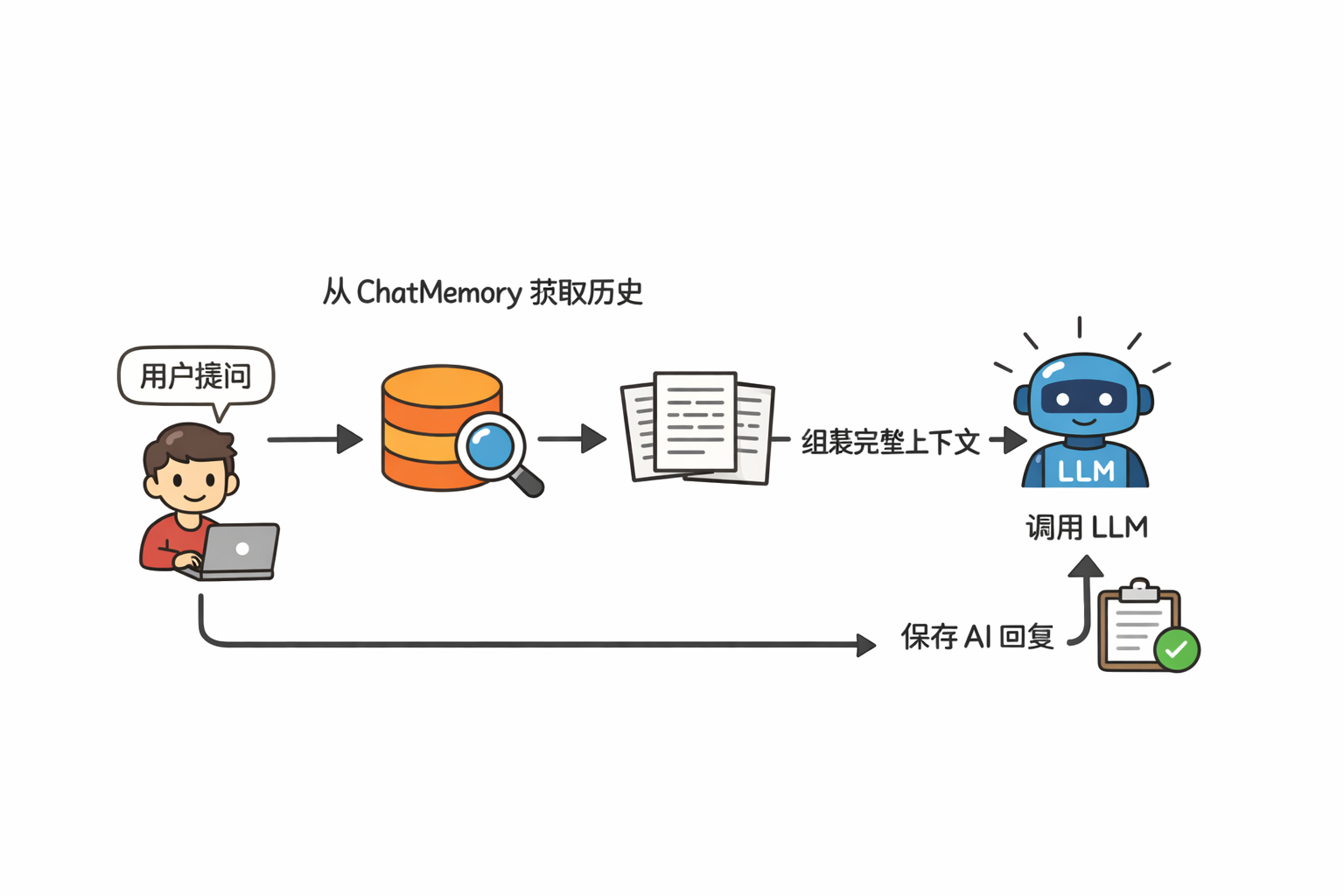
所以上下文要进行合理的管理,一般我们会借助数据库,比如Redis,mysql等,有个专业术语叫上下文管理。
4.1.2 实现
内存存储上下文,需要实现ChatMemory接口。
ChatMemory 是 Spring AI 框架中用于管理和存储对话历史的核心接口。它的主要作用是在与大语言模型(LLM)的多轮交互中维护上下文记忆。
流程示意:
package com.mszlu.ai.alibaba.common;

import java.util.ArrayList;
import java.util.Collections;
import java.util.List;
import java.util.Map;
import java.util.concurrent.ConcurrentHashMap;

import org.springframework.ai.chat.memory.ChatMemory;
import org.springframework.ai.chat.messages.Message;
import org.springframework.stereotype.Component;
import org.springframework.util.Assert;

@Component
public class InMemoryChatMemory implements ChatMemory {

    /**
     * 线程安全的对话消息存储。
     * 键:对话ID,值:按顺序排列的消息列表
     */
    private final Map<String, List<Message>> memoryStore = new ConcurrentHashMap<>();

    /**
     * 创建一个新的空内存对话存储。
     */
    public InMemoryChatMemory() {
        // 无需初始化
    }

    /**
     * {@inheritDoc}
     * <p>将消息保存到内存中。如果对话已存在,则追加到历史记录末尾。</p>
     *
     * @throws IllegalArgumentException 如果对话ID为空或消息列表为null
     */
    @Override
    public void add(String conversationId, List<Message> messages) {
        Assert.hasText(conversationId, "conversationId 不能为空");
        Assert.notNull(messages, "messages 不能为 null");

        // 使用原子操作处理并发修改
        memoryStore.compute(conversationId, (id, existingMessages) -> {
            List<Message> updatedList = new ArrayList<>();
            if (existingMessages != null) {
                updatedList.addAll(existingMessages);
            }
            updatedList.addAll(messages);
            return updatedList;
        });
    }

    /**
     * {@inheritDoc}
     * <p>返回消息的不可修改视图,防止外部修改内部状态。</p>
     *
     * @return 对话的消息列表,如未找到则返回空列表
     */
    @Override
    public List<Message> get(String conversationId) {
        Assert.hasText(conversationId, "conversationId 不能为空");

        List<Message> messages = memoryStore.get(conversationId);
        return messages != null
                ? Collections.unmodifiableList(new ArrayList<>(messages))
                : Collections.emptyList();
    }

    /**
     * {@inheritDoc}
     * <p>删除指定对话的所有消息。</p>
     */
    @Override
    public void clear(String conversationId) {
        Assert.hasText(conversationId, "conversationId 不能为空");
        memoryStore.remove(conversationId);
    }

    /**
     * 获取内存中存储的所有对话ID。
     *
     * @return 不可修改的对话ID列表
     */
    public List<String> getConversationIds() {
        return List.copyOf(memoryStore.keySet());
    }

    /**
     * 获取指定对话存储的消息数量。
     *
     * @param conversationId 对话ID
     * @return 消息数量,如对话不存在则返回0
     * @throws IllegalArgumentException 如果对话ID为空
     */
    public int size(String conversationId) {
        Assert.hasText(conversationId, "conversationId 不能为空");
        List<Message> messages = memoryStore.get(conversationId);
        return messages != null ? messages.size() : 0;
    }

    /**
     * 清空内存中的所有对话。
     */
    public void clearAll() {
        memoryStore.clear();
    }

    /**
     * 检查指定对话是否存在于内存中。
     *
     * @param conversationId 要检查的对话ID
     * @return 存在返回true,否则返回false
     */
    public boolean contains(String conversationId) {
        Assert.hasText(conversationId, "conversationId 不能为空");
        return memoryStore.containsKey(conversationId);
    }

}
2
3
4
5
6
7
8
9
10
11
12
13
14
15
16
17
18
19
20
21
22
23
24
25
26
27
28
29
30
31
32
33
34
35
36
37
38
39
40
41
42
43
44
45
46
47
48
49
50
51
52
53
54
55
56
57
58
59
60
61
62
63
64
65
66
67
68
69
70
71
72
73
74
75
76
77
78
79
80
81
82
83
84
85
86
87
88
89
90
91
92
93
94
95
96
97
98
99
100
101
102
103
104
105
106
107
108
109
110
111
112
113
114
115
116
117
118
service:
Advisor是一个中间件的实现,可以在ChatClient 发起请求前后,做一些操作,比如插入上下文,修改提示词,记录日志等
package com.mszlu.ai.alibaba.service;

import com.mszlu.ai.alibaba.common.InMemoryChatMemory;
import org.springframework.ai.chat.client.ChatClient;
import org.springframework.ai.chat.client.advisor.MessageChatMemoryAdvisor;
import org.springframework.ai.chat.memory.ChatMemory;
import org.springframework.ai.chat.memory.MessageWindowChatMemory;
import org.springframework.ai.chat.model.ChatModel;
import org.springframework.beans.factory.annotation.Qualifier;
import org.springframework.stereotype.Service;

@Service
public class ContextChatService {

    private final ChatClient chatClient;

    public ContextChatService(@Qualifier("dashScopeChatModel") ChatModel chatModel) {
        ChatMemory chatMemory = new InMemoryChatMemory();
        this.chatClient = ChatClient.builder(chatModel)
            .defaultAdvisors(MessageChatMemoryAdvisor.builder(chatMemory).build())
            .build();
    }

    /**
     * 多轮对话
     * 传入 conversationId 来保持对话上下文
     */
    public String chatWithContext(String conversationId, String message) {
        return chatClient.prompt()
            .user(message)
            .advisors(a -> a.param(ChatMemory.CONVERSATION_ID, conversationId))
            .call()
            .content();
    }
}
2
3
4
5
6
7
8
9
10
11
12
13
14
15
16
17
18
19
20
21
22
23
24
25
26
27
28
29
30
31
32
33
34
35
4.1.3 测试
package com.mszlu.ai.alibaba.controller;

import com.mszlu.ai.alibaba.service.ContextChatService;
import org.springframework.web.bind.annotation.*;

import java.util.Map;

@RestController
@RequestMapping("/api/context")
public class ContextController {

    private final ContextChatService contextChatService;

    public ContextController(ContextChatService contextChatService) {
        this.contextChatService = contextChatService;
    }

    @PostMapping("/chat")
    public Map<String, String> chat(@RequestParam String conversationId,
                                    @RequestParam String message) {
        String aiResponse = contextChatService.chatWithContext(conversationId,message);

        return Map.of(
                "user", message,
                "ai", aiResponse
        );
    }

}
2
3
4
5
6
7
8
9
10
11
12
13
14
15
16
17
18
19
20
21
22
23
24
25
26
27
28
29
30


4.2 结构化输出
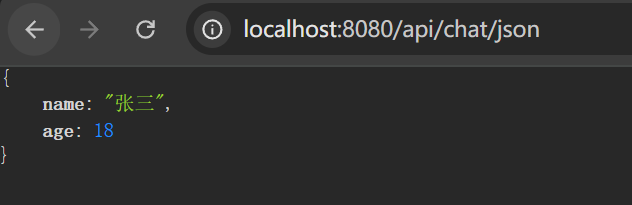
我们可以让AI返回JSON这种结构化的数据:
package com.mszlu.ai.alibaba.service;

import org.springframework.ai.chat.client.ChatClient;
import org.springframework.ai.chat.model.ChatModel;
import org.springframework.beans.factory.annotation.Qualifier;
import org.springframework.stereotype.Service;

@Service
public class StructuredOutputService {

    private final ChatClient chatClient;

    public StructuredOutputService(@Qualifier("dashScopeChatModel") ChatModel chatModel) {
        this.chatClient = ChatClient.builder(chatModel).build();
    }

    /**
     * 定义输出结构
     */
    public record Person(String name, int age) {}

    /**
     * 返回结构化数据
     */
    public Person extractUserInfo() {
        return chatClient.prompt()
                .user("生成一个用户信息:名字张三,年龄18")
                .call()
                .entity(Person.class);
    }
}
2
3
4
5
6
7
8
9
10
11
12
13
14
15
16
17
18
19
20
21
22
23
24
25
26
27
28
29
30
31
 @GetMapping("/json")
    public StructuredOutputService.Person chatWithJson() {
        return structuredOutputService.extractUserInfo();
    }
2
3
4
4.3 日志+敏感词
Advisor是一个中间件的实现,可以在ChatClient 发起请求前后,做一些操作,比如插入上下文,修改提示词,记录日志等,类似于Spring 的AOP。
通过Advisor机制,我们可以无入侵的添加很多功能,Spring AI内置了一些Advisor。
4.3.1 SimpleLoggerAdvisor
SimpleLoggerAdvisor 主要是用于打印对话日志,对话日志中包含metedata、output、result等信息,可以看到messageType、id、使用token数、返回信息整个结构。
配置:
# 日志级别
logging:
  level:
    com.alibaba.cloud.ai: DEBUG
    org:
      springframework:
          ai:
            chat:
              client:
                advisor:
                  SimpleLoggerAdvisor: DEBUG
2
3
4
5
6
7
8
9
10
11
public ContextChatService(@Qualifier("dashScopeChatModel") ChatModel chatModel) {
        ChatMemory chatMemory = new InMemoryChatMemory();
        this.chatClient = ChatClient.builder(chatModel)
            .defaultAdvisors(
                    MessageChatMemoryAdvisor.builder(chatMemory).build(),
                    new SimpleLoggerAdvisor()
            )
            .build();
    }
2
3
4
5
6
7
8
9
10
4.3.2 SafeGuardAdvisor
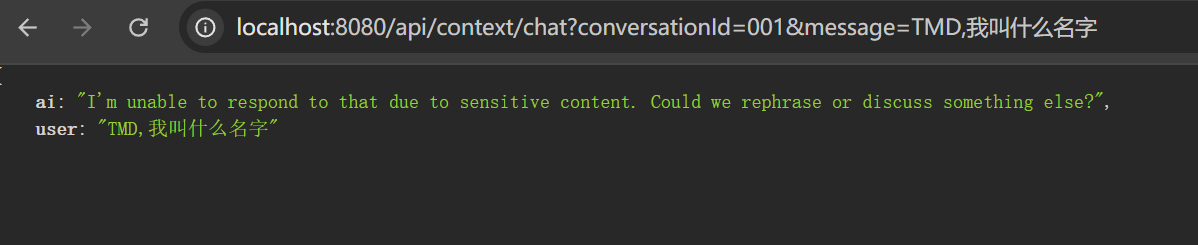
SafeGuardAdvisor 用于定义敏感词,在问题中出现敏感词中止回答。
使用new SafeGuardAdvisor 新建一个敏感词Advisor,使用list.of定义敏感词集合。
 public ContextChatService(@Qualifier("dashScopeChatModel") ChatModel chatModel) {
        ChatMemory chatMemory = new InMemoryChatMemory();
        this.chatClient = ChatClient.builder(chatModel)
            .defaultAdvisors(
                    MessageChatMemoryAdvisor.builder(chatMemory).build(),
                    new SafeGuardAdvisor(List.of(
                            "TMD"
                    ))
            )
            .build();
    }
2
3
4
5
6
7
8
9
10
11
12
5. 课后练习
- 实现一个翻译服务:支持中英互译,使用特定的系统提示
- 添加对话历史持久化:把对话记录保存到数据库