
Tool Calling
教程制作:码神之路(https://www.mszlu.com/docs/ai/msai/01.html)
AI Agent实战教程:https://www.mszlu.com/docs/ai/msai/01.html
- 提供Go和Java版本,目前Go版本已经完结, Java版本正在更新中...
1. 概念
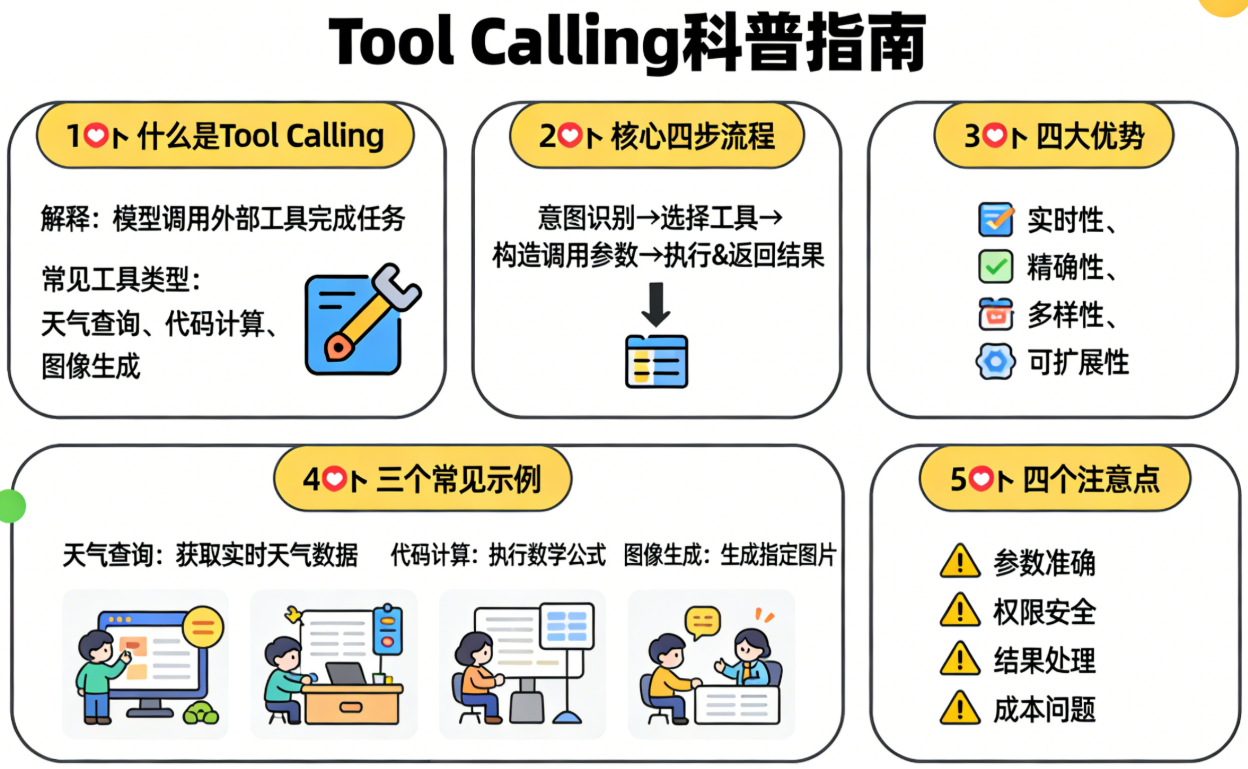
大模型有三大局限:
- 知识有截止日期:LLM 的知识仅限于训练数据的截止日期,无法获取实时信息。比如问"今天深圳天气如何?",模型无法回答,因为它被"困"在训练完成时的知识里
- 无法与外界互动:纯文本生成的 LLM 不能发送邮件、预订机票、查询数据库或修改系统状态——它只能"说",不能"做"
- 计算和推理的局限:LLM 擅长语言理解和短程逻辑推理,但在实时计算、大规模数据处理方面表现不佳,需要借助外部工具(如计算器、代码执行器)来完成
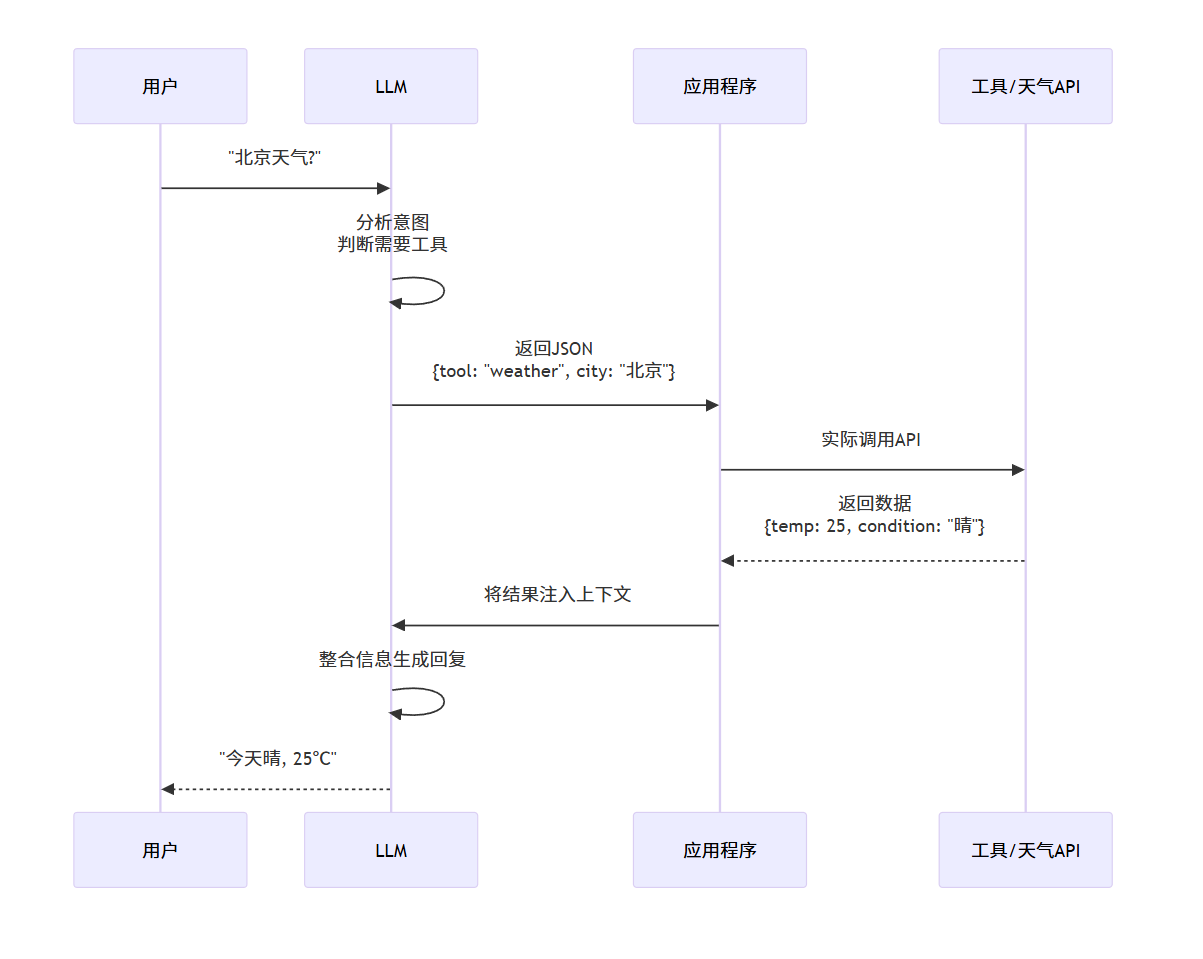
Tool Calling机制可以让大模型与外部世界交互。具体步骤:
- 定义工具:开发者用 JSON Schema 描述可用工具(名称、功能、参数)
- 模型决策:LLM 分析用户请求,判断是否需要调用工具
- 生成指令:如需调用,模型输出结构化 JSON(函数名+参数),而非自然语言
- 执行工具:应用程序接收 JSON,实际调用 API/函数/数据库
- 整合回复:工具结果返回给 LLM,模型生成最终自然语言回答
2. 定义Tools
Tools 是 tool calling 的构建块,它们由 ToolCallback 接口建模。
2.1 使用@Tool注解
package com.mszlu.ai.alibaba.tools;

import org.springframework.ai.tool.annotation.Tool;
import org.springframework.ai.tool.annotation.ToolParam;
import org.springframework.stereotype.Component;

@Component
public class CalculatorTools {

    /**
     * 加法工具
     * @Tool 注解将这个方法注册为 AI 可调用的工具
     */
    @Tool(name = "add", description = "计算两个数的和")
    public double add(
            @ToolParam(description = "第一个数字") double a,
            @ToolParam(description = "第二个数字") double b) {
        return a + b;
    }

    /**
     * 乘法工具
     */
    @Tool(name = "multiply", description = "计算两个数的乘积")
    public double multiply(
            @ToolParam(description = "第一个数字") double a,
            @ToolParam(description = "第二个数字") double b) {
        return a * b;
    }

    /**
     * 复杂一点的工具:计算 BMI
     */
    @Tool(name = "calculate_bmi", description = "计算身体质量指数(BMI)")
    public String calculateBMI(
            @ToolParam(description = "身高(米)") double height,
            @ToolParam(description = "体重(公斤)") double weight) {

        double bmi = weight / (height * height);
        String category;

        if (bmi < 18.5) category = "偏瘦";
        else if (bmi < 24) category = "正常";
        else if (bmi < 28) category = "偏胖";
        else category = "肥胖";

        return String.format("BMI: %.2f (%s)", bmi, category);
    }
}
1
2
3
4
5
6
7
8
9
10
11
12
13
14
15
16
17
18
19
20
21
22
23
24
25
26
27
28
29
30
31
32
33
34
35
36
37
38
39
40
41
42
43
44
45
46
47
48
49
2
3
4
5
6
7
8
9
10
11
12
13
14
15
16
17
18
19
20
21
22
23
24
25
26
27
28
29
30
31
32
33
34
35
36
37
38
39
40
41
42
43
44
45
46
47
48
49
2.2 使用 FunctionToolCallback
package com.mszlu.ai.alibaba.tools;

import org.springframework.ai.tool.ToolCallback;
import org.springframework.ai.tool.annotation.ToolParam;
import org.springframework.ai.tool.function.FunctionToolCallback;
import org.springframework.context.annotation.Bean;
import org.springframework.stereotype.Service;

@Service
public class WeatherToolService {

    /**
     * 定义天气查询工具的输入
     */
    public record WeatherRequest(
        @ToolParam(description = "城市名称,如:北京、上海") String city,
        @ToolParam(description = "日期,格式:yyyy-MM-dd,默认为今天") String date
    ) {}

    /**
     * 定义天气查询工具的输出
     */
    public record WeatherResponse(
        String city,
        String date,
        int temperature,
        String weather,
        String suggestion
    ) {}

    /**
     * 创建天气工具
     */
    @Bean
    public ToolCallback weatherTool() {
        return FunctionToolCallback.builder("weather_query", this::queryWeather)
            .description("查询指定城市的天气信息")
            .inputType(WeatherRequest.class)
            .build();
    }

    /**
     * 工具的实现逻辑
     */
    private WeatherResponse queryWeather(WeatherRequest request) {
        // 这里调用真实的天气 API
        // 示例中使用模拟数据
        return new WeatherResponse(
            request.city(),
            request.date() != null ? request.date() : "今天",
            25,
            "晴",
            "天气不错,适合外出"
        );
    }
}
1
2
3
4
5
6
7
8
9
10
11
12
13
14
15
16
17
18
19
20
21
22
23
24
25
26
27
28
29
30
31
32
33
34
35
36
37
38
39
40
41
42
43
44
45
46
47
48
49
50
51
52
53
54
55
56
2
3
4
5
6
7
8
9
10
11
12
13
14
15
16
17
18
19
20
21
22
23
24
25
26
27
28
29
30
31
32
33
34
35
36
37
38
39
40
41
42
43
44
45
46
47
48
49
50
51
52
53
54
55
56
3. 调用Tool
3.1 调用机制
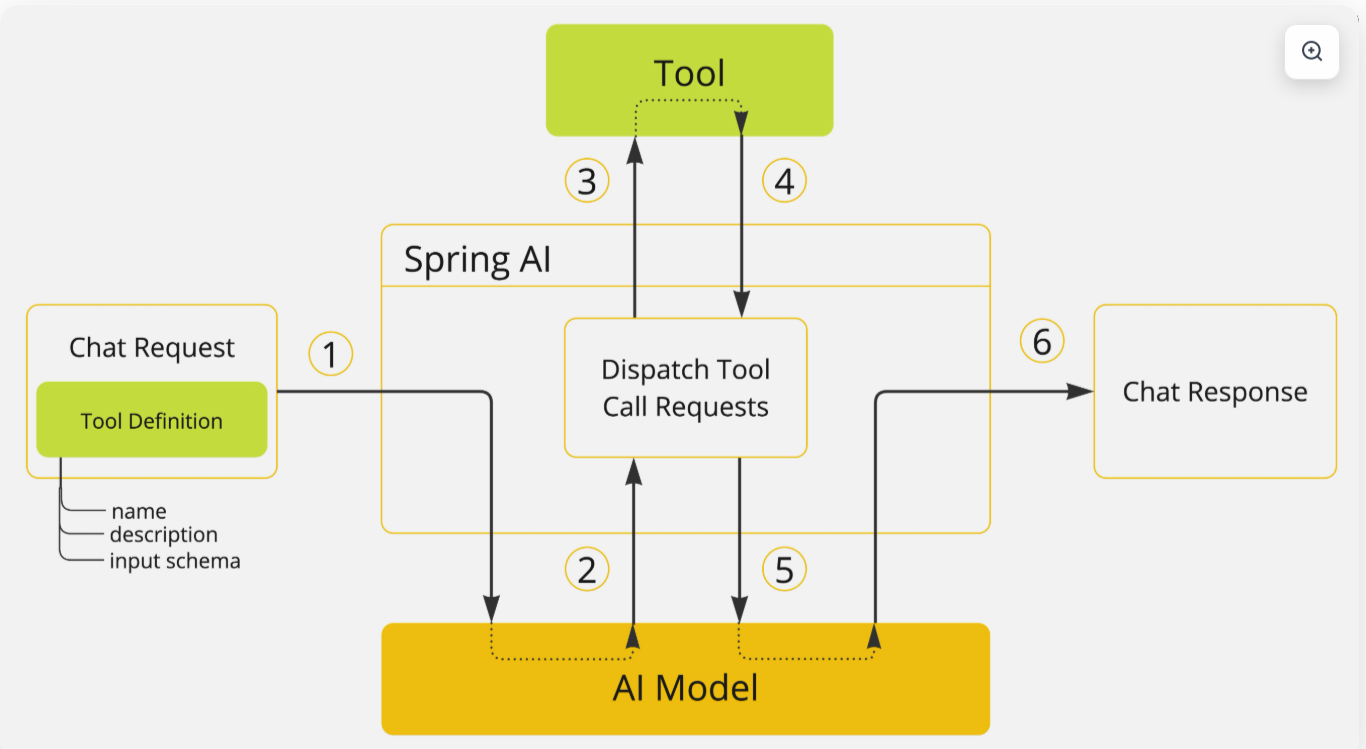
Tools 是 tool calling 的构建块,它们由 ToolCallback 接口建模。
ChatModel 实现透明地将 tool call 请求分派到相应的 ToolCallback 实现,并将 tool call 结果发送回 model,最终生成最终响应。
它们使用 ToolCallingManager 接口来执行此操作,该接口负责管理 tool 执行生命周期。
ChatClient 和 ChatModel 都接受 ToolCallback 对象列表,以使 tools 可用于 model 和最终执行它们的 ToolCallingManager。
3.2 日志
Tool calling 功能的所有主要操作都在 DEBUG 级别记录。您可以通过将 org.springframework.ai 包的日志级别设置为 DEBUG 来启用日志记录。
# 日志级别
logging:
  level:
    com.alibaba.cloud.ai: DEBUG
    org.springframework.ai: DEBUG
    org:
      springframework:
          ai:
            chat:
              client:
                advisor:
                  SimpleLoggerAdvisor: DEBUG
1
2
3
4
5
6
7
8
9
10
11
12
2
3
4
5
6
7
8
9
10
11
12
3.3 @Tool调用
package com.mszlu.ai.alibaba.service;

import org.springframework.ai.chat.client.ChatClient;
import org.springframework.ai.chat.messages.UserMessage;
import org.springframework.ai.chat.model.ChatModel;
import org.springframework.ai.chat.model.ChatResponse;
import org.springframework.ai.chat.prompt.ChatOptions;
import org.springframework.ai.chat.prompt.Prompt;
import org.springframework.ai.model.tool.ToolCallingChatOptions;
import org.springframework.ai.model.tool.ToolCallingManager;
import org.springframework.ai.model.tool.ToolExecutionResult;
import org.springframework.ai.tool.ToolCallback;
import org.springframework.beans.factory.annotation.Qualifier;
import org.springframework.stereotype.Service;

import java.util.List;

@Service
public class ToolService {

    private final ChatModel chatModel;

    public ToolService(@Qualifier("dashScopeChatModel") ChatModel chatModel) {
        this.chatModel = chatModel;
    }

    /**
     * 手动执行工具调用
     */
    public String chatWithTools(String userInput, List<ToolCallback> tools) {
        ChatOptions chatOptions = ToolCallingChatOptions.builder()
                .toolCallbacks(tools)
                .internalToolExecutionEnabled(false)
                .build();
        Prompt prompt = new Prompt(
                new UserMessage(userInput),
                chatOptions
        );
        ChatClient chatClient = ChatClient.builder(chatModel).build();
        ToolCallingManager toolCallingManager = ToolCallingManager.builder().build();
        ChatResponse chatResponse = chatClient
                .prompt(prompt)
                .call()
                .chatResponse();
        // 检查 AI 是否要求调用工具
        while (chatResponse != null && chatResponse.hasToolCalls()) {
            System.out.println("AI requires tool calls: " + chatResponse.getResult().getOutput().getToolCalls());
            ToolExecutionResult toolExecutionResult = toolCallingManager.executeToolCalls(prompt, chatResponse);
            prompt = new Prompt(toolExecutionResult.conversationHistory());
            chatResponse = chatClient
                    .prompt(prompt)
                    .call()
                    .chatResponse();
        }
        // 没有工具调用,直接返回 AI 的回复
        return chatResponse == null ? "no result" : chatResponse.getResult().getOutput().getText();
    }
}
1
2
3
4
5
6
7
8
9
10
11
12
13
14
15
16
17
18
19
20
21
22
23
24
25
26
27
28
29
30
31
32
33
34
35
36
37
38
39
40
41
42
43
44
45
46
47
48
49
50
51
52
53
54
55
56
57
58
2
3
4
5
6
7
8
9
10
11
12
13
14
15
16
17
18
19
20
21
22
23
24
25
26
27
28
29
30
31
32
33
34
35
36
37
38
39
40
41
42
43
44
45
46
47
48
49
50
51
52
53
54
55
56
57
58
package com.mszlu.ai.alibaba.controller;

import com.mszlu.ai.alibaba.service.ToolService;
import com.mszlu.ai.alibaba.tools.CalculatorTools;
import org.springframework.ai.support.ToolCallbacks;
import org.springframework.ai.tool.ToolCallback;
import org.springframework.web.bind.annotation.GetMapping;
import org.springframework.web.bind.annotation.RequestMapping;
import org.springframework.web.bind.annotation.RequestParam;
import org.springframework.web.bind.annotation.RestController;

import java.util.List;
import java.util.Map;

/**
 * AI 对话接口
 *
 * 通过 HTTP 请求和 AI 对话
 */
@RestController
@RequestMapping("/api/tool")
public class ToolController {

    private final ToolService toolService;
    private final CalculatorTools calculatorTools;

    public ToolController(ToolService toolService, CalculatorTools calculatorTools) {
        this.toolService = toolService;
        this.calculatorTools = calculatorTools;
    }

    @GetMapping("/cal")
    public Map<String, String> cal(@RequestParam String message) {
        ToolCallback[] callbacks = ToolCallbacks.from(calculatorTools);
        String aiResponse = toolService.chatWithTools(
                message,
                List.of(callbacks)
        );
        return Map.of(
                "user", message,
                "ai", aiResponse
        );
    }


}
1
2
3
4
5
6
7
8
9
10
11
12
13
14
15
16
17
18
19
20
21
22
23
24
25
26
27
28
29
30
31
32
33
34
35
36
37
38
39
40
41
42
43
44
45
46
47
2
3
4
5
6
7
8
9
10
11
12
13
14
15
16
17
18
19
20
21
22
23
24
25
26
27
28
29
30
31
32
33
34
35
36
37
38
39
40
41
42
43
44
45
46
47
3.4 ToolCallback调用
package com.mszlu.ai.alibaba.controller;

import com.mszlu.ai.alibaba.service.ToolService;
import org.springframework.ai.tool.ToolCallback;
import org.springframework.web.bind.annotation.GetMapping;
import org.springframework.web.bind.annotation.RequestMapping;
import org.springframework.web.bind.annotation.RequestParam;
import org.springframework.web.bind.annotation.RestController;

import java.util.List;
import java.util.Map;

/**
 * AI 对话接口
 *
 * 通过 HTTP 请求和 AI 对话
 */
@RestController
@RequestMapping("/api/tool")
public class ToolController {

    private final ToolService toolService;
    private final List<ToolCallback> toolCallbacks;

    public ToolController(ToolService toolService, List<ToolCallback> toolCallbacks) {
        this.toolService = toolService;
        this.toolCallbacks = toolCallbacks;
    }

    @GetMapping("/weather")
    public Map<String, String> weather(@RequestParam String message) {
        String aiResponse = toolService.chatWithTools(
                message,
                toolCallbacks
        );
        return Map.of(
                "user", message,
                "ai", aiResponse
        );
    }

}
1
2
3
4
5
6
7
8
9
10
11
12
13
14
15
16
17
18
19
20
21
22
23
24
25
26
27
28
29
30
31
32
33
34
35
36
37
38
39
40
41
42
43
2
3
4
5
6
7
8
9
10
11
12
13
14
15
16
17
18
19
20
21
22
23
24
25
26
27
28
29
30
31
32
33
34
35
36
37
38
39
40
41
42
43
4. 课后练习
- 实现天气查询工具:接入真实的天气 API