
Agent
教程制作:码神之路(https://www.mszlu.com/docs/ai/msai/01.html)
AI Agent实战教程:https://www.mszlu.com/docs/ai/msai/01.html
- 提供Go和Java版本,目前Go版本已经完结, Java版本正在更新中...
前面学习的ChatClient,是让AI回答问题,这叫做 Chat(对话)。
依靠对话,大模型只是被动的回答问题,上节课,我们在调用工具时,需要自己在代码中进行判断,在执行复杂任务时,很难去完成。
这就需要Agent(智能体),它能够:
- 自主思考:分析问题、制定计划
- 调用工具:使用外部能力解决问题
- 多轮迭代:不断尝试直到完成任务
1. 理论基础(ReAct)
ReAct(Reasoning + Acting)是一种将推理和行动相结合的 Agent 范式。
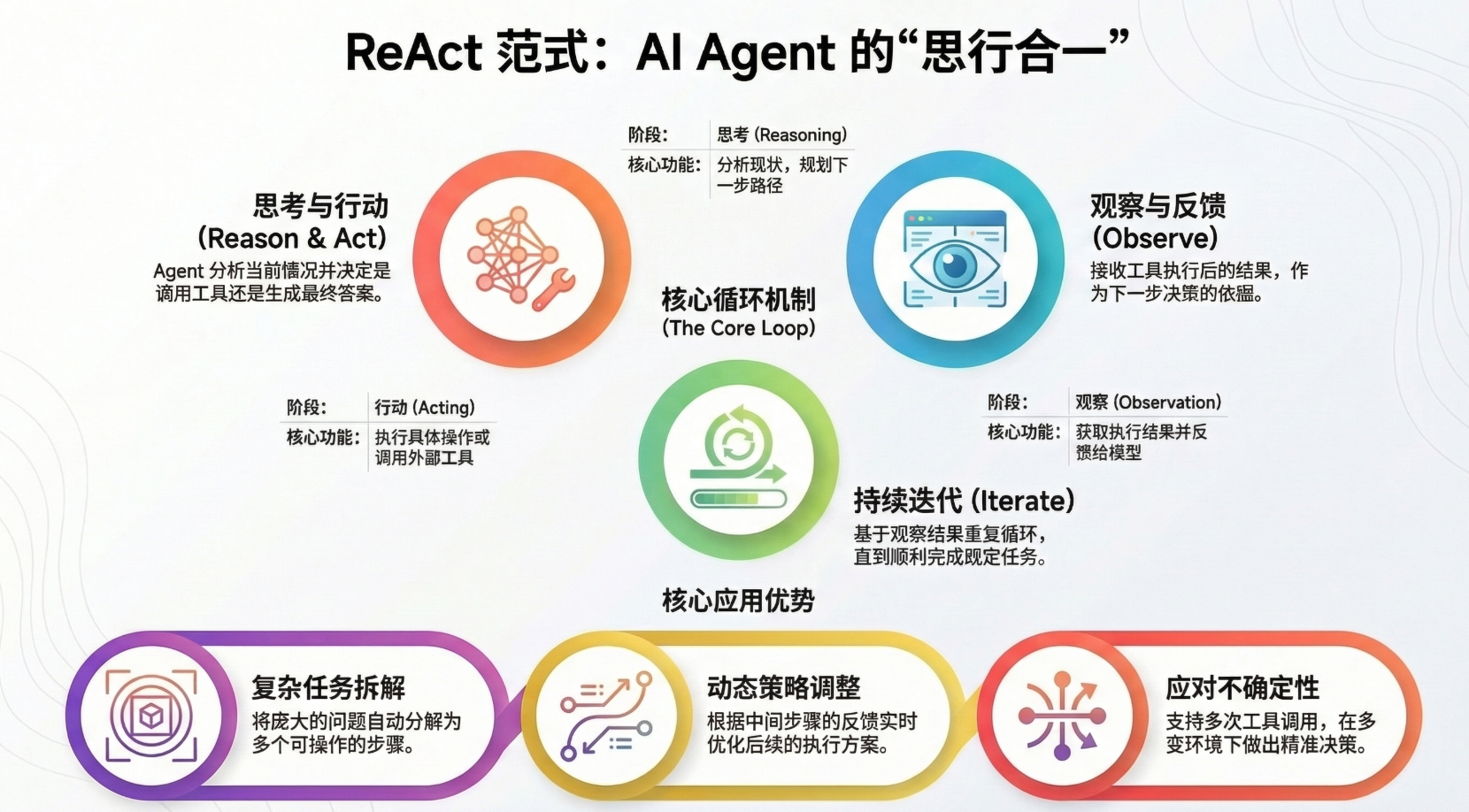
在这个范式中,Agent 会:
- 思考(Reasoning):分析当前情况,决定下一步该做什么
- 行动(Acting):执行工具调用或生成最终答案
- 观察(Observation):接收工具执行的结果
- 迭代:基于观察结果继续思考和行动,直到完成任务
这个循环使 Agent 能够:
- 将复杂问题分解为多个步骤
- 动态调整策略基于中间结果
- 处理需要多次工具调用的任务
- 在不确定的环境中做出决策
2. ReactAgent工作原理
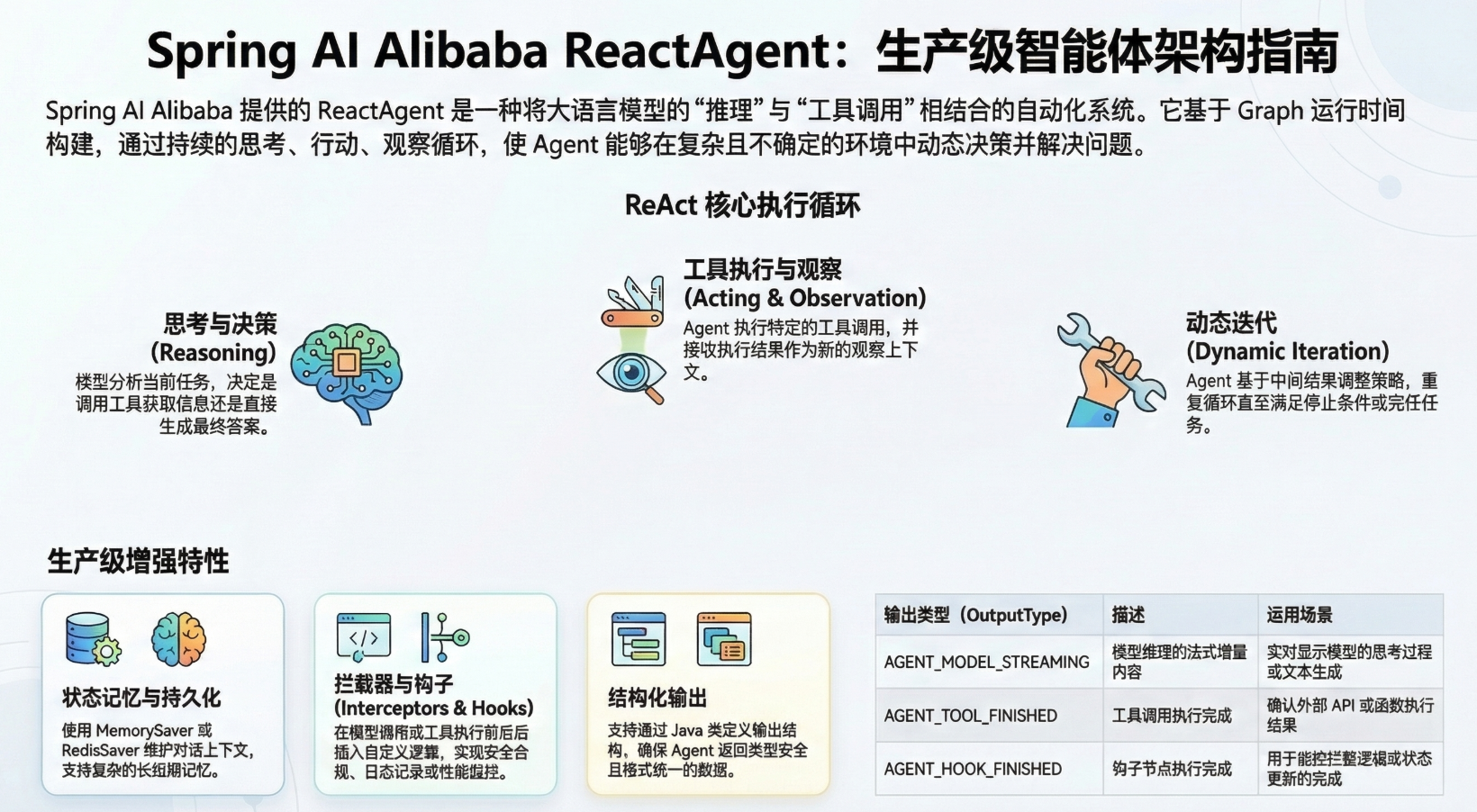
Spring AI Alibaba 中的ReactAgent 基于 Graph 运行时构建。Graph 由节点(steps)和边(connections)组成,定义了 Agent 如何处理信息。Agent 在这个 Graph 中移动,执行如下节点:
- Model Node (模型节点):调用 LLM 进行推理和决策
- Tool Node (工具节点):执行工具调用
- Hook Nodes (钩子节点):在关键位置插入自定义逻辑
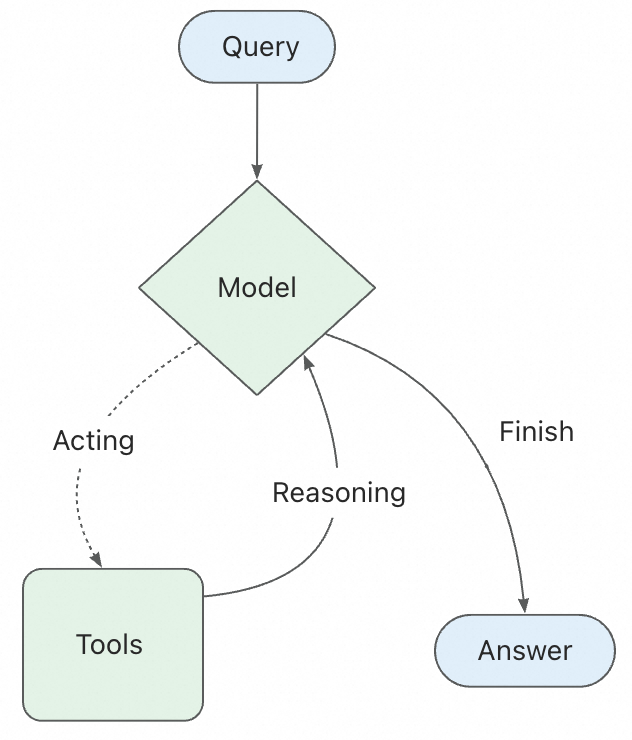
ReactAgent 的核心执行流程:
3. 数学助手Agent
3.1 提示词
你是一个数学专家助手,擅长利用工具解决各种数学问题。
3.2 数学助手工具
package com.mszlu.ai.alibaba.tools;

import org.springframework.ai.tool.annotation.Tool;
import org.springframework.ai.tool.annotation.ToolParam;
import org.springframework.stereotype.Component;

@Component
public class MathTools {

    @Tool(name = "add", description = "计算两个数的和")
    public double add(
            @ToolParam(description = "第一个数") double a,
            @ToolParam(description = "第二个数") double b
    ) {
        return a + b;
    }

    @Tool(name = "subtract", description = "计算两个数的差")
    public double subtract(@ToolParam(description = "第一个数") double a,
                           @ToolParam(description = "第二个数") double b
    ) {
        return a - b;
    }

    @Tool(name = "multiply", description = "计算两个数的乘积")
    public double multiply(
            @ToolParam(description = "第一个数") double a,
            @ToolParam(description = "第二个数") double b
    ) {
        return a * b;
    }

    @Tool(name = "divide", description = "计算两个数的商")
    public double divide(
            @ToolParam(description = "第一个数") double a,
            @ToolParam(description = "第二个数") double b
    ) {
        if (b == 0) throw new IllegalArgumentException("不能除以0");
        return a / b;
    }

    @Tool(name = "sqrt", description = "计算平方根")
    public double sqrt(@ToolParam(description = "第一个数") double a) {
        return Math.sqrt(a);
    }
}
2
3
4
5
6
7
8
9
10
11
12
13
14
15
16
17
18
19
20
21
22
23
24
25
26
27
28
29
30
31
32
33
34
35
36
37
38
39
40
41
42
43
44
45
46
3.3 Agent构建
package com.mszlu.ai.alibaba.agent;

import com.alibaba.cloud.ai.graph.agent.ReactAgent;
import com.mszlu.ai.alibaba.tools.MathTools;
import org.springframework.ai.chat.model.ChatModel;
import org.springframework.beans.factory.annotation.Qualifier;
import org.springframework.context.annotation.Bean;
import org.springframework.context.annotation.Configuration;

@Configuration
public class MathAgentConfig {

    private final MathTools mathTools;
    private static final String MATH_INSTRUCTION = """
            你是一个数学专家助手,擅长利用工具解决各种数学问题。
            """;

    public MathAgentConfig(MathTools mathTools) {
        this.mathTools = mathTools;
    }

    @Bean
    public ReactAgent mathAgent(
            @Qualifier("dashScopeChatModel") ChatModel chatModel) {
        return ReactAgent.builder()
                .name("MathAgent")
                .model(chatModel)
                .instruction(MATH_INSTRUCTION)
                .methodTools(mathTools) //注册工具
//                .hooks(
//                        ModelCallLimitHook
//                                .builder()
//                                .runLimit(10)
//                                .build()
//                )   // 限制最多调用 10 次
                .enableLogging(true)
                .build();
    }
}
2
3
4
5
6
7
8
9
10
11
12
13
14
15
16
17
18
19
20
21
22
23
24
25
26
27
28
29
30
31
32
33
34
35
36
37
38
39
3.4 测试Agent
package com.mszlu.ai.alibaba.service;

import com.alibaba.cloud.ai.graph.exception.GraphRunnerException;
import com.mszlu.ai.alibaba.agent.MathAgentConfig;
import org.springframework.ai.chat.model.ChatModel;
import org.springframework.beans.factory.annotation.Qualifier;
import org.springframework.stereotype.Service;

/**
 * AI 对话服务
 * <p>
 * 这是你的第一个 AI 服务,它可以和 AI 模型对话!
 */
@Service
public class AgentService {

    private final ChatModel chatModel;

    private final MathAgentConfig mathAgentConfig;

    /**
     * 构造器注入 ChatClient
     * Spring AI 会自动创建并配置好 ChatClient
     */
    public AgentService(@Qualifier("dashScopeChatModel") ChatModel chatModel, MathAgentConfig mathAgentConfig) {
        this.chatModel = chatModel;
        this.mathAgentConfig = mathAgentConfig;
    }

    public String chatWithAgent(String userInput) {
        try {
            return mathAgentConfig.mathAgent(chatModel).call(userInput).getText();
        } catch (GraphRunnerException e) {
            throw new RuntimeException(e);
        }
    }
}
2
3
4
5
6
7
8
9
10
11
12
13
14
15
16
17
18
19
20
21
22
23
24
25
26
27
28
29
30
31
32
33
34
35
36
37
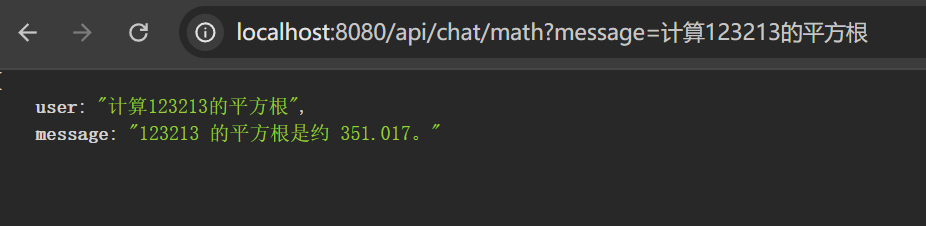
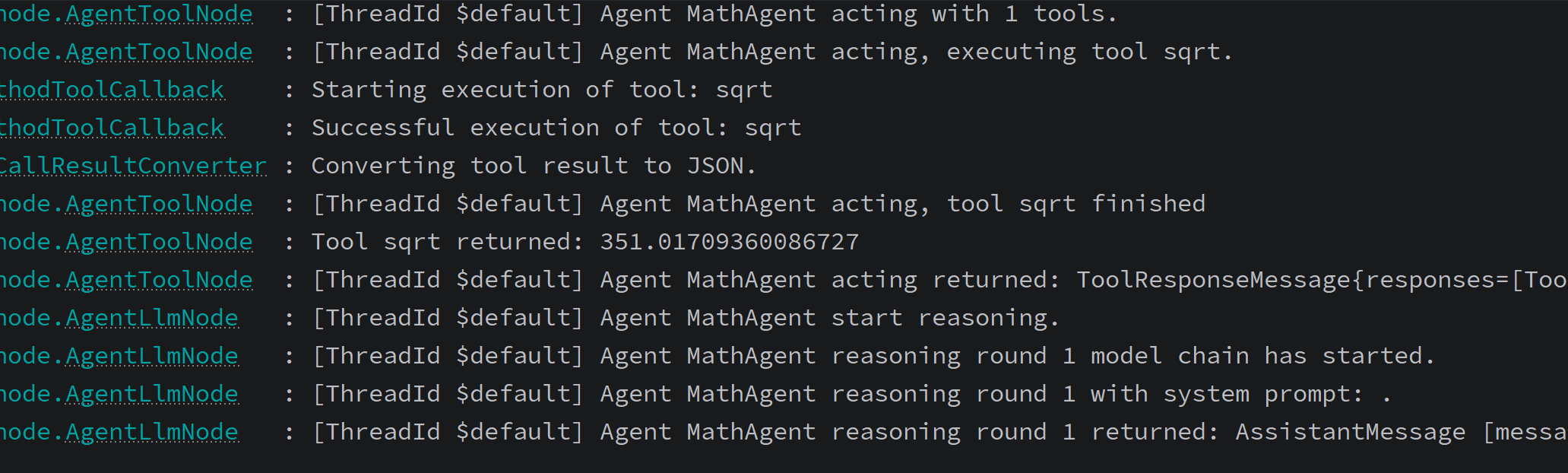
 @GetMapping("/math")
    public Map<String, String> chatWithAgent(@RequestParam String message) {
        String aiResponse = agentService.chatWithAgent(message);
        return Map.of(
                "user", message,
                "message", aiResponse
        );
    }
2
3
4
5
6
7
8
4. 带 Memory 的 Agent
package com.mszlu.ai.alibaba.agent;

import com.alibaba.cloud.ai.graph.agent.ReactAgent;
import com.alibaba.cloud.ai.graph.checkpoint.savers.MemorySaver;
import org.springframework.ai.chat.model.ChatModel;
import org.springframework.beans.factory.annotation.Qualifier;
import org.springframework.context.annotation.Bean;
import org.springframework.context.annotation.Configuration;

@Configuration
public class MemoryAgentConfig {

    private static final String CHAT_INSTRUCTION = """
            你是一个贴心的聊天助手。
            记住用户告诉你的信息,在后续对话中使用。
            """;

    @Bean
    public MemorySaver chatMemorySaver() {
        return new MemorySaver();  // 内存存储,开发测试用
    }

    @Bean
    public ReactAgent chatAgent(
            @Qualifier("dashScopeChatModel") ChatModel chatModel,
            MemorySaver memorySaver
    ) {

        return ReactAgent.builder()
                .name("ChatAgent")
                .model(chatModel)
                .instruction(CHAT_INSTRUCTION)
                .saver(memorySaver)         // 配置记忆存储
                .enableLogging(true)
                .build();
    }
}
2
3
4
5
6
7
8
9
10
11
12
13
14
15
16
17
18
19
20
21
22
23
24
25
26
27
28
29
30
31
32
33
34
35
36
37
4.1 测试
package com.mszlu.ai.alibaba.service;

import com.alibaba.cloud.ai.graph.checkpoint.savers.MemorySaver;
import com.alibaba.cloud.ai.graph.exception.GraphRunnerException;
import com.mszlu.ai.alibaba.agent.MathAgentConfig;
import com.mszlu.ai.alibaba.agent.MemoryAgentConfig;
import org.springframework.ai.chat.model.ChatModel;
import org.springframework.beans.factory.annotation.Qualifier;
import org.springframework.stereotype.Service;

/**
 * AI 对话服务
 * <p>
 * 这是你的第一个 AI 服务,它可以和 AI 模型对话!
 */
@Service
public class AgentService {

    private final ChatModel chatModel;

    private final MathAgentConfig mathAgentConfig;
    private final MemoryAgentConfig memoryAgentConfig;
    private final MemorySaver chatMemorySaver;

    /**
     * 构造器注入 ChatClient
     * Spring AI 会自动创建并配置好 ChatClient
     */
    public AgentService(@Qualifier("dashScopeChatModel") ChatModel chatModel, MathAgentConfig mathAgentConfig, MemoryAgentConfig memoryAgentConfig, MemorySaver chatMemorySaver) {
        this.chatModel = chatModel;
        this.mathAgentConfig = mathAgentConfig;
        this.memoryAgentConfig = memoryAgentConfig;
        this.chatMemorySaver = chatMemorySaver;
    }

    public String chatWithAgent(String userInput) {
        try {
            return mathAgentConfig.mathAgent(chatModel).call(userInput).getText();
        } catch (GraphRunnerException e) {
            throw new RuntimeException(e);
        }
    }

    public String chatWithMemory(String userInput) {
        try {
            return memoryAgentConfig
                    .chatAgent(chatModel, chatMemorySaver)
                    .call(userInput)
                    .getText();
        } catch (GraphRunnerException e) {
            throw new RuntimeException(e);
        }
    }
}
2
3
4
5
6
7
8
9
10
11
12
13
14
15
16
17
18
19
20
21
22
23
24
25
26
27
28
29
30
31
32
33
34
35
36
37
38
39
40
41
42
43
44
45
46
47
48
49
50
51
52
53
54
 @GetMapping("/memory")
    public Map<String, String> chatWithAgentMemory(@RequestParam String message) {
        String aiResponse = agentService.chatWithMemory(message);
        return Map.of(
                "user", message,
                "message", aiResponse
        );
    }
2
3
4
5
6
7
8
5. Hooks
Hooks 允许在 Agent 执行的关键点插入自定义逻辑。
Hook 执行位置:
BEFORE_AGENT/AFTER_AGENT:Agent 整体执行前后BEFORE_MODEL/AFTER_MODEL:Agent Loop 循环过程中,每次模型调用前后
5.1 ModelCallLimitHook
作用:限制模型调用次数。
import com.alibaba.cloud.ai.graph.agent.hook.modelcalllimit.ModelCallLimitHook;
import com.alibaba.cloud.ai.graph.checkpoint.savers.MemorySaver;

// 使用内置的 ModelCallLimitHook 限制模型调用次数
ReactAgent agent = ReactAgent.builder()
.name("my_agent")
.model(chatModel)
.hooks(ModelCallLimitHook.builder().runLimit(5).build()) // 限制最多调用 5 次
.saver(new MemorySaver())
.build();
2
3
4
5
6
7
8
9
10
5.2 自定义Hook
package com.mszlu.ai.alibaba.agent.hooks;

import com.alibaba.cloud.ai.graph.OverAllState;
import com.alibaba.cloud.ai.graph.RunnableConfig;
import com.alibaba.cloud.ai.graph.agent.hook.AgentHook;
import com.alibaba.cloud.ai.graph.agent.hook.HookPosition;
import com.alibaba.cloud.ai.graph.agent.hook.HookPositions;

import java.util.Map;
import java.util.concurrent.CompletableFuture;

// 1. AgentHook - 在 Agent 开始/结束时执行,每次Agent调用只会运行一次
@HookPositions({HookPosition.BEFORE_AGENT, HookPosition.AFTER_AGENT})
public class LoggingHook extends AgentHook {
    @Override
    public String getName() {
        return "logging";
    }

    @Override
    public CompletableFuture<Map<String, Object>> beforeAgent(OverAllState state, RunnableConfig config) {
        System.out.println("Agent 开始执行");
        return CompletableFuture.completedFuture(Map.of());
    }

    @Override
    public CompletableFuture<Map<String, Object>> afterAgent(OverAllState state, RunnableConfig config) {
        System.out.println("Agent 执行完成");
        return CompletableFuture.completedFuture(Map.of());
    }
}
2
3
4
5
6
7
8
9
10
11
12
13
14
15
16
17
18
19
20
21
22
23
24
25
26
27
28
29
30
31
@Bean
    public ReactAgent mathAgent(
            @Qualifier("dashScopeChatModel") ChatModel chatModel) {
        return ReactAgent.builder()
                .name("MathAgent")
                .model(chatModel)
                .instruction(MATH_INSTRUCTION)
                .methodTools(mathTools) //注册工具
                .hooks(
                        ModelCallLimitHook
                                .builder()
                                .runLimit(10)
                                .build(),
                        new LoggingHook()
                )   // 限制最多调用 10 次
                .enableLogging(true)
                .build();
    }
}
2
3
4
5
6
7
8
9
10
11
12
13
14
15
16
17
18
19
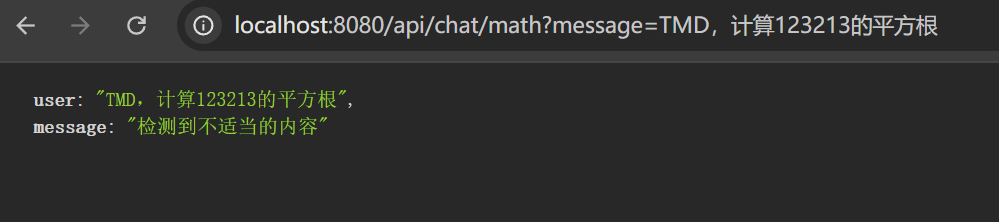
6. Interceptors(拦截器)
Interceptors 提供更细粒度的控制,可以拦截和修改模型调用和工具执行。
package com.mszlu.ai.alibaba.agent.interceptors;

import com.alibaba.cloud.ai.graph.agent.interceptor.ModelCallHandler;
import com.alibaba.cloud.ai.graph.agent.interceptor.ModelInterceptor;
import com.alibaba.cloud.ai.graph.agent.interceptor.ModelRequest;
import com.alibaba.cloud.ai.graph.agent.interceptor.ModelResponse;
import org.springframework.ai.chat.messages.AssistantMessage;
import org.springframework.ai.chat.messages.Message;

import java.util.List;

// ModelInterceptor - 内容安全检查
public class GuardrailInterceptor extends ModelInterceptor {
    @Override
    public ModelResponse interceptModel(ModelRequest request, ModelCallHandler handler) {
        // 前置:检查输入
        if (containsSensitiveContent(request.getMessages())) {
            return ModelResponse.of(AssistantMessage.builder().content("检测到不适当的内容").build());
        }

        // 执行调用
        ModelResponse response = handler.call(request);

        // 后置:检查输出
        return sanitizeIfNeeded(response);
    }

    @Override
    public String getName() {
        return "GuardrailInterceptor";
    }

    // 输入敏感词(完全禁止)
    private static final List<String> BLOCKED_KEYWORDS = List.of(
            "TMD"
    );


    private InputCheckResult checkInput(List<Message> messages) {
        if (messages == null || messages.isEmpty()) {
            return InputCheckResult.safe();
        }

        StringBuilder allText = new StringBuilder();
        for (Message message : messages) {
            if (message.getText() != null) {
                allText.append(message.getText()).append(" ");
            }
        }

        String text = allText.toString().toLowerCase();

        // 检查禁止词
        for (String keyword : BLOCKED_KEYWORDS) {
            if (text.contains(keyword.toLowerCase())) {
                return InputCheckResult.blocked("包含敏感词: " + keyword);
            }
        }

        return InputCheckResult.safe();
    }

    /**
     * 检查单个文本是否包含敏感内容
     */
    private boolean containsSensitiveContent(List<Message> messages) {
        return checkInput(messages).blocked();
    }

    // ========== 输出处理方法 ==========

    /**
     * 对输出进行安全处理
     */
    private ModelResponse sanitizeIfNeeded(ModelResponse response) {
        return sanitizeOutput(response);
    }

    /**
     * 输入检查结果
     */
    private record InputCheckResult(boolean blocked, boolean warning, String reason) {

        static InputCheckResult safe() {
            return new InputCheckResult(false, false, null);
        }

        static InputCheckResult blocked(String reason) {
            return new InputCheckResult(true, false, reason);
        }

        static InputCheckResult warning(String reason) {
            return new InputCheckResult(false, true, reason);
        }

        boolean hasWarning() {
            return warning;
        }
    }

    /**
     * 清理输出内容中的敏感信息
     */
    private ModelResponse sanitizeOutput(ModelResponse response) {
        if (response == null || response.getMessage() == null) {
            return response;
        }
        if (response.getChatResponse() == null) {
            //工具调用
            return response;
        }
        String originalContent = response.getChatResponse().getResult().getOutput().getText();
        if (originalContent == null || originalContent.isEmpty()) {
            return response;
        }

        String sanitizedContent = originalContent;
        boolean wasSanitized = false;

        // 手机号脱敏:13812345678 → 138****5678
        if (sanitizedContent.matches(".*1[3-9]\\d{9}.*")) {
            sanitizedContent = sanitizedContent.replaceAll(
                    "(1[3-9]\\d)(\\d{4})(\\d{4})",
                    "$1****$3"
            );
            wasSanitized = true;
        }
        if (wasSanitized) {
            return ModelResponse.of(
                    AssistantMessage.builder()
                            .content(sanitizedContent)
                            .build()
            );
        }
        return response;
    }
}
2
3
4
5
6
7
8
9
10
11
12
13
14
15
16
17
18
19
20
21
22
23
24
25
26
27
28
29
30
31
32
33
34
35
36
37
38
39
40
41
42
43
44
45
46
47
48
49
50
51
52
53
54
55
56
57
58
59
60
61
62
63
64
65
66
67
68
69
70
71
72
73
74
75
76
77
78
79
80
81
82
83
84
85
86
87
88
89
90
91
92
93
94
95
96
97
98
99
100
101
102
103
104
105
106
107
108
109
110
111
112
113
114
115
116
117
118
119
120
121
122
123
124
125
126
127
128
129
130
131
132
133
134
135
136
137
138
139
@Bean
    public ReactAgent mathAgent(
            @Qualifier("dashScopeChatModel") ChatModel chatModel) {
        return ReactAgent.builder()
                .name("MathAgent")
                .model(chatModel)
                .instruction(MATH_INSTRUCTION)
                .methodTools(mathTools) //注册工具
                .hooks(
                        ModelCallLimitHook
                                .builder()
                                .runLimit(10)
                                .build(),
                        new LoggingHook()
                )   // 限制最多调用 10 次
                .interceptors(new GuardrailInterceptor())
                .enableLogging(true)
                .build();
    }
}
2
3
4
5
6
7
8
9
10
11
12
13
14
15
16
17
18
19
20

7. 流式输出
在 Agent 场景中,流式输出的核心是处理 StreamingOutput 类型。无论是模型推理、工具调用还是 Hook 节点,输出都统一为这个类型。
7.1 使用 OutputType 区分输出类型
通过 OutputType 枚举可以区分不同节点的输出,以及判断是流式增量内容还是完成输出:
| OutputType | 说明 |
|---|---|
AGENT_MODEL_STREAMING | 模型推理的流式增量内容 |
AGENT_MODEL_FINISHED | 模型推理完成,可获取全量内容 |
AGENT_TOOL_STREAMING | 工具调用的流式增量内容 |
AGENT_TOOL_FINISHED | 工具调用完成 |
AGENT_HOOK_STREAMING | Hook 节点的流式增量内容 |
AGENT_HOOK_FINISHED | Hook 节点完成 |
提示
- 对于 Hook 等通常非流式的节点,直接使用
AGENT_HOOK_FINISHED读取内容即可 - 并非所有节点输出都有意义,尤其是 Hook 节点可能产生无效输出,建议通过
OutputType进行过滤
7.2 消息类型识别
StreamingOutput.message() 返回的消息有多种类型,需要结合 OutputType 和消息元数据进行区分处理:
| OutputType | 消息类型 | 判断条件 | 说明 |
|---|---|---|---|
AGENT_MODEL_STREAMING / AGENT_MODEL_FINISHED | 模型普通响应 | AssistantMessage 且 metadata.reasoningContent 为空 | 模型的实际回复内容,通过 getText() 获取 |
AGENT_MODEL_STREAMING / AGENT_MODEL_FINISHED | 模型 Thinking | AssistantMessage 且 metadata.reasoningContent 不为空 | 模型的思考过程(如 DeepSeek 等支持 Thinking 的模型) |
AGENT_MODEL_FINISHED | 工具调用请求 | AssistantMessage 且 hasToolCalls() 为 true | 模型请求调用工具,包含工具名称和参数 |
AGENT_TOOL_FINISHED | 工具响应结果 | ToolResponseMessage | 工具执行后的返回结果 |
7.3 示例
 public Flux<NodeOutput> chatWithAgentByStream(String userInput) {
        try {
            return mathAgentConfig.mathAgent(chatModel).stream(userInput);
        } catch (GraphRunnerException e) {
            throw new RuntimeException(e);
        }
    }
2
3
4
5
6
7
ngOutput streamingOutput) {
                        OutputType type = streamingOutput.getOutputType();

                        // 处理模型推理的流式输出
                        if (type == OutputType.AGENT_MODEL_STREAMING) {
                            // 流式增量内容,逐步显示
                            System.out.print(streamingOutput.message().getText());
                        } else if (type == OutputType.AGENT_MODEL_FINISHED) {
                            // 模型推理完成,可获取完整响应
                            System.out.println("\n模型输出完成");
                        }

                        // 处理工具调用完成(目前不支持 STREAMING)
                        if (type == OutputType.AGENT_TOOL_FINISHED) {
                            System.out.println("工具调用完成: " + output.node());
                        }

                        // 对于 Hook 节点,通常只关注完成事件(如果Hook没有有效输出可以忽略)
                        if (type == OutputType.AGENT_HOOK_FINISHED) {
                            System.out.println("Hook 执行完成: " + output.node());
                        }
                    }
                },
                error -> System.err.println("错误: " + error),
                () -> System.out.println("Agent 执行完成")
        );
        return stream.map(NodeOutput::node);
    }
2
3
4
5
6
7
8
9
10
11
12
13
14
15
16
17
18
19
20
21
22
23
24
25
26
27
28